
Snag list with photo,
AR measurement and severity.
Photo of the snag, quick dictation, AI classifies severity and proposes the remedial action. AR measurement in the image, signature on the display, PDF with letterhead from the site. For consultants, surveyors, project managers and self-snagging buyers.
7-day pro trial. Cancel anytime.
Definition
What is a snag list?
A snag list (called a "punch list" in US English) is the documented list of defects, unfinished items and corrections required on a construction project, typically captured at practical completion or handover. It tracks each item with photo, location, severity and the responsible party. Without a structured snag list, defects discovered later become disputed, and the party making the claim carries the burden of proof.
Snag lists come up in four typical situations: practical completion handover, pre-handover inspection of a new-build, defects-liability-period management, tenant move-in / move-out. DokuAI covers all four with one workflow.
What goes in
What every usable snag list contains.
Eight items belong in every snag list with evidentiary value. Miss one and the value drops in a dispute. DokuAI walks you through each, photo, voice, AR measurement, signature.
- 01 Date, time and full project address
- 02 Names and roles of inspector, contractor and client representative
- 03 Each snag with photo and exact location
- 04 Description of the defect and likely cause
- 05 Severity classification (minor / major / critical)
- 06 Specific remedial action with deadline
- 07 Responsible party (trade / subcontractor)
- 08 Signatures of both parties, on the spot if possible
Features
Four tools that make snagging precise.
01 / 04
AI classifies severity
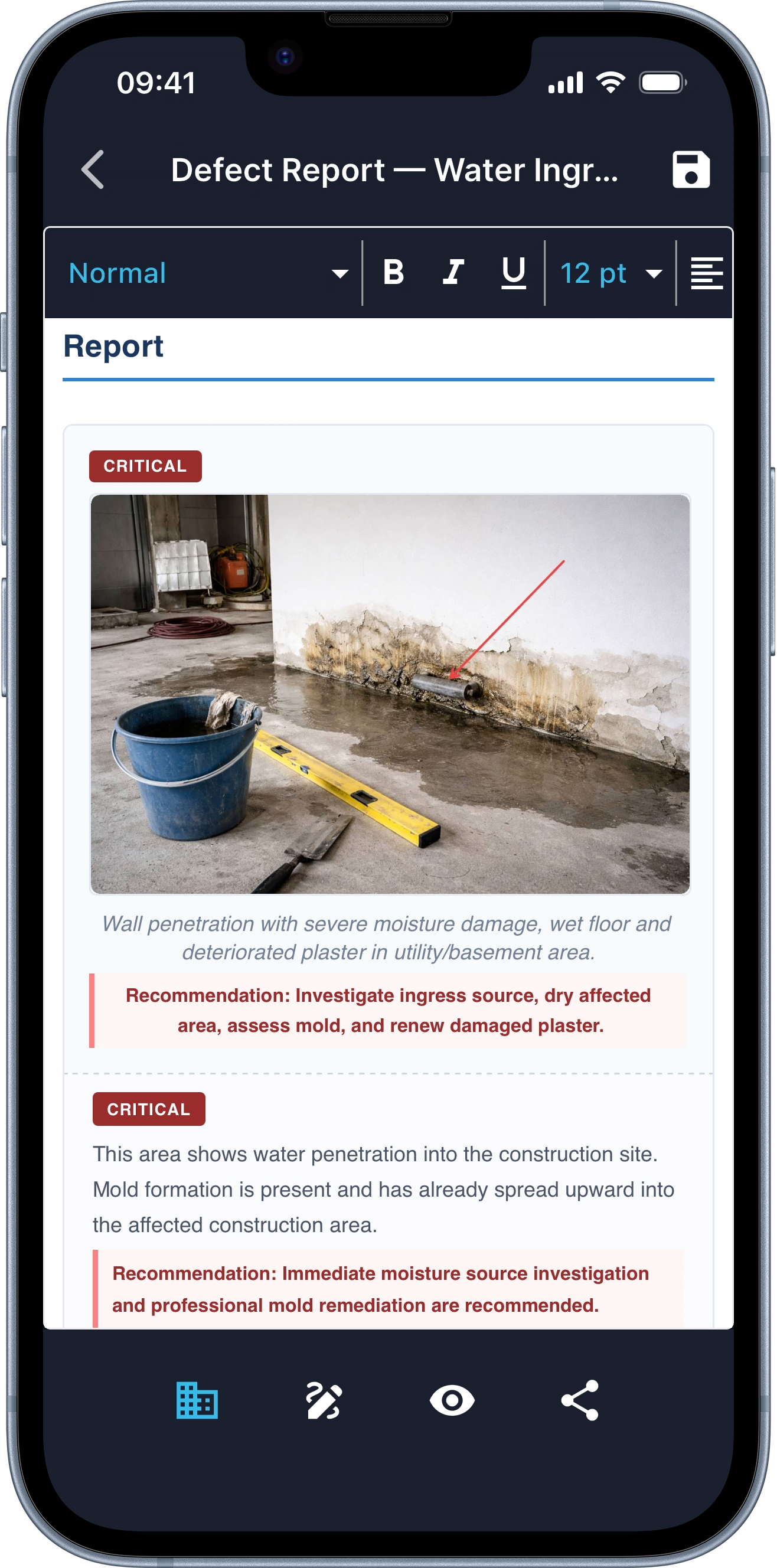
You photograph and dictate, the AI identifies the snag type (crack, missing skirting, paint damage, plumbing leak) and proposes the severity (minor / major / critical). You confirm or correct.
02 / 04
AR measurement (LiDAR) for snag scope
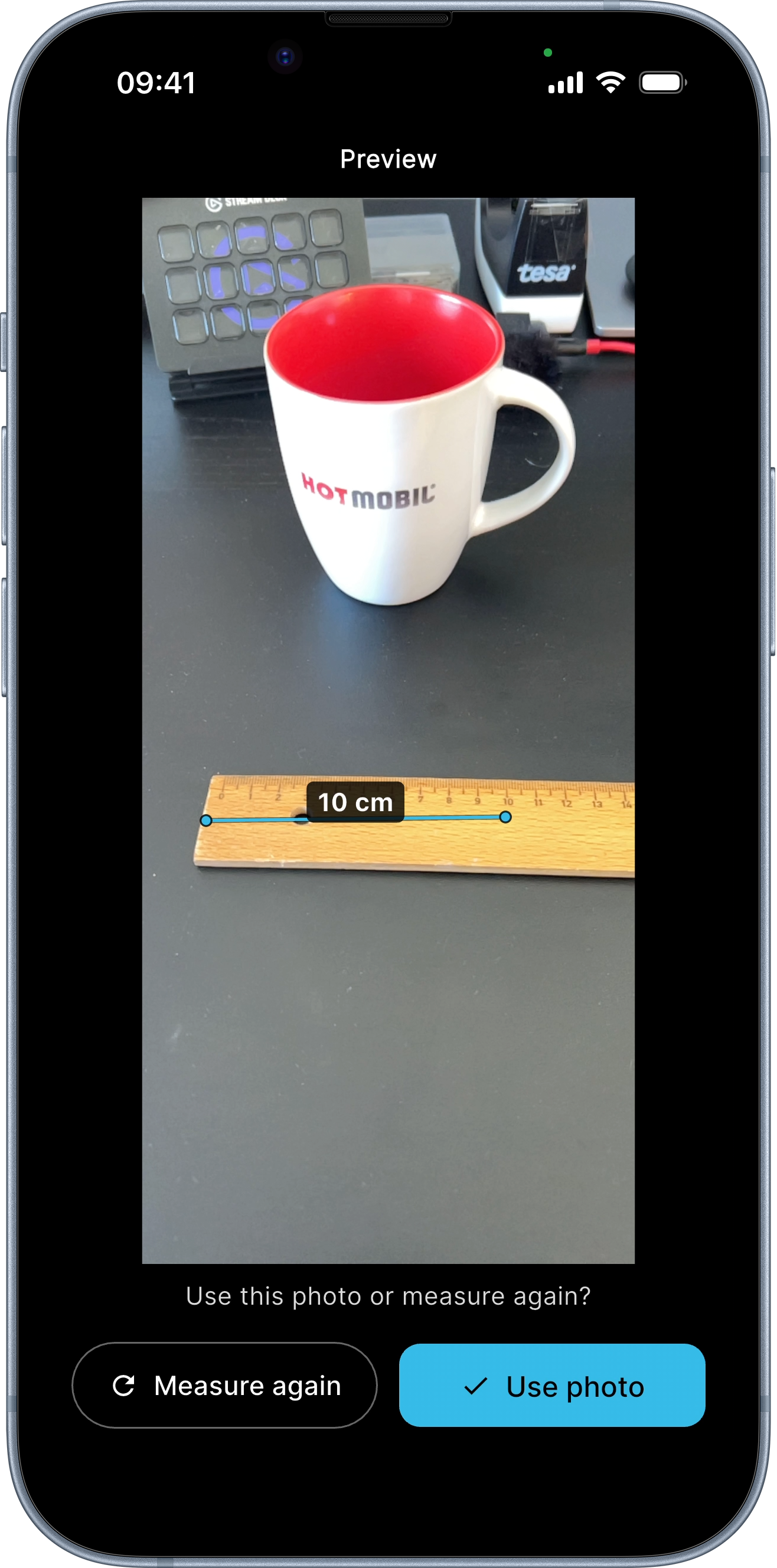
Crack length, hole size, gap width, tap two points in the photo, the measurement is drawn into the image. On iPhone 12 Pro+ ±0.5 cm accurate. The scope of the snag is not negotiable later.
03 / 04
Annotations directly on the photo
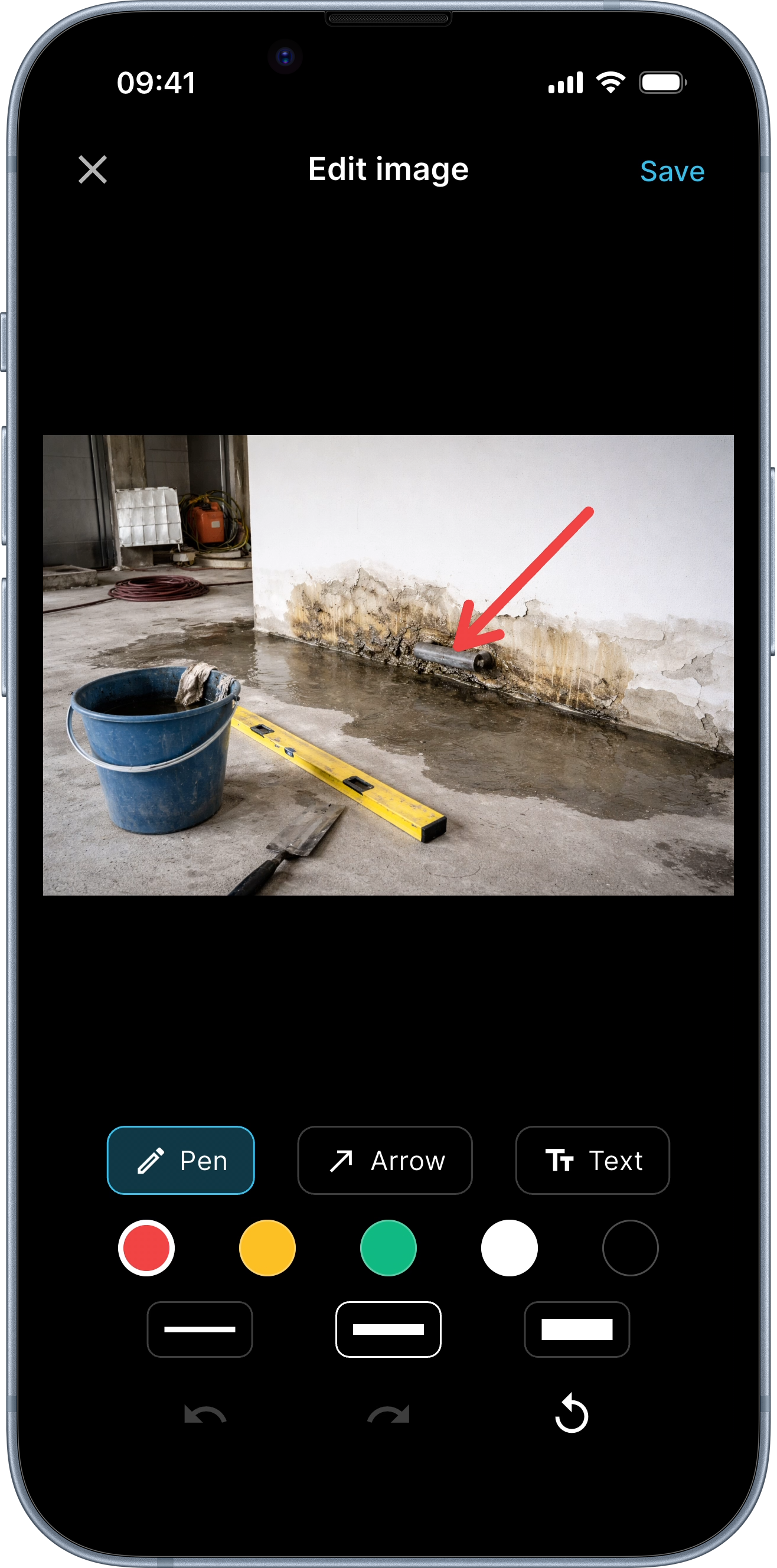
Circle, arrow, label, mark the snag on the photo so it is immediately visible in the PDF. No more "which crack do you mean?" emails.
04 / 04
PDF with letterhead and both signatures
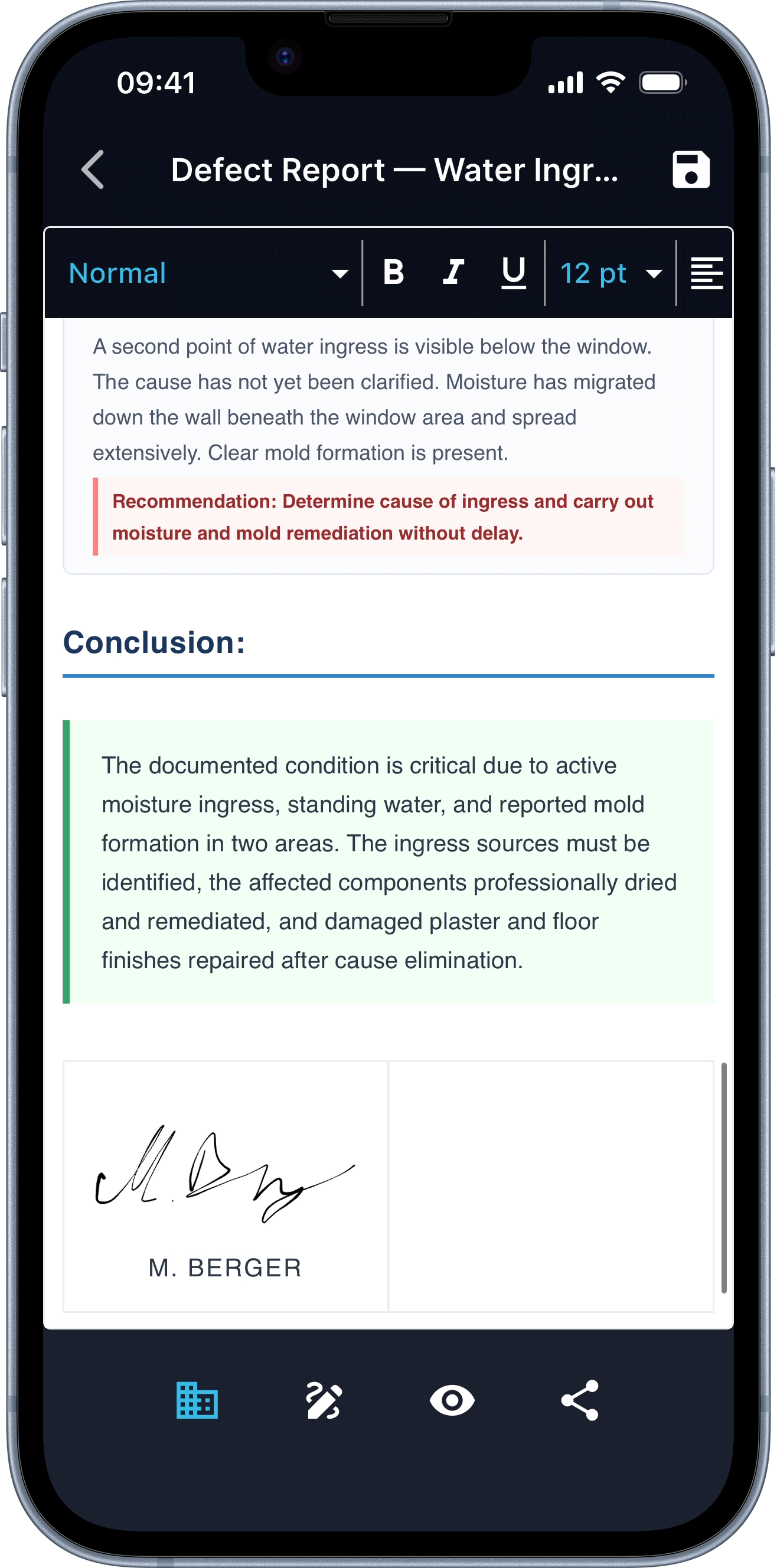
Logo, address, project reference, set once, applied to every snag list. Both parties sign on the screen, each signature time-stamped. PDF sent via WhatsApp, email or cloud from the site.
Use cases
Four situations, one tool.
-
01 / 04
Practical completion handover
At practical completion, the consultant or surveyor walks the project and captures every snag, anything not strictly complete to specification. DokuAI does it in 30 minutes instead of three hours.
-
02 / 04
Pre-handover inspection
The buyer (or their consultant) inspects a new-build property before legal completion. Snag list is sent to the developer for rectification before keys are handed over.
-
03 / 04
Defects liability period (DLP)
Within the warranty period (12 months / 24 months UK; 1 year / 2 years EU), the client reports defects. Each one needs to be logged, photographed and tracked to closure.
-
04 / 04
Tenant move-out / move-in
Landlords and letting agents document property condition at handover. DokuAI generates the snag list and the move-in / move-out inspection report in one workflow.
Who it’s for
Five profiles, one concrete benefit.
| Role | Concrete benefit |
|---|---|
| Building consultant / surveyor | Snagging walk in 30 min instead of 3 hours. Snag list sent as PDF to the contractor with severity and deadline, archived in the consultancy back-office. |
| New-build buyer | Pre-handover snagging without paying a consultant. The AI guides through what to check; photos + measurements + signed PDF for the developer. |
| Letting agent / landlord | Snag list for property handover doubles as the move-in / move-out condition report. One workflow, two purposes. |
| Project manager (construction) | Defects liability period management, log each defect, set deadline, track to closure. AR measurement removes scope disputes. |
| Insurance adjuster | Damage assessment with photo + AR measurement + structured report in minutes. PDF goes straight to claims processing. |
FAQ
Common snag list questions.
Updated: June 2026
What is the difference between a snag list and a punch list?
Same concept, different region: "snag list" is UK / IE / AU / NZ; "punch list" is US / CA. Both refer to the documented list of defects and unfinished items at practical completion or handover. DokuAI works for both, the app uses neutral terminology and the PDF output adapts to your audience.
When is a snag list required?
At any handover where defects need to be agreed and tracked: practical completion of a construction project, pre-handover inspection of a new-build, end of defects liability period, tenant move-in / move-out, post-renovation acceptance. While not always legally mandatory, the party without a snag list carries the burden of proof when defects are disputed later, making it factually essential.
What should a snag list include?
Date, project, parties, each snag with photo and exact location, description and likely cause, severity classification (minor / major / critical), remedial action with deadline, responsible party (trade or subcontractor), signatures of both parties. DokuAI walks you through each point, AI structures the entry, you confirm.
How does DokuAI compare to dedicated snagging apps like Snagar or Finalcad?
Snagar (UK) and Finalcad (FR/global) are dedicated snagging platforms with project-team workflows, plan annotation and bigger-scale defect management. DokuAI is the lighter, AI-first option for solo consultants and small inspection businesses who want fast voice-to-PDF without team setup. For multi-stakeholder projects with formal defect-tracking workflows, dedicated platforms still win. We have a separate comparison vs PlanRadar that covers the team-focused defect-management category.
Does the app work offline on site?
Capture works fully offline, photos, voice notes and AR markings stay on the device. Report generation needs a connection; once online the app picks up where it left off. You never lose a capture, even in a basement without signal.
Which iPhones support AR measurement on snags?
iPhone 12 Pro / Pro Max and every newer Pro model, plus iPad Pro from 2020 onwards, these measure with ±0.5 cm accuracy via LiDAR. Standard iPhones (no LiDAR) measure with ±2-8 cm accuracy, still useful for relative scope but less precise.
Can the contractor refuse to sign the snag list?
Yes, but: the refusal is noted in the report (DokuAI has a dedicated field). The snag list remains valid as a single-party-signed record because the inspector has documented the data with timestamps and photos. Adding a witness who also signs is the cleanest mitigation. For formal practical completion, a chartered surveyor often serves as the neutral party.
What severity classification does DokuAI use?
Three tiers consistent with UK / EU construction practice: minor (cosmetic, easily remedied, no impact on function), major (function impaired or usability affected, could justify withholding retention), critical (structural, fire safety or health-and-safety, immediate action required). The AI proposes the classification; you decide finally.
Where are my photos and data stored?
Only during the AI processing of the report. Photo and voice data go encrypted to our EU servers, the finished PDF comes back to the phone. After at most 365 days everything is deleted automatically, or earlier if you delete it in the app. GDPR-compliant, EU servers.
What does the snag list app cost?
7-day pro trial, cancel anytime. After that, a subscription, current pricing in the App Store (iOS) / Google Play (Android). A single subscription covers one user. For consultancy firms with multiple staff, each person uses their own subscription, no central setup required.
Next snagging walk, list finished before you leave.
7-day pro trial. First snagging walk documented in 30 minutes.